
Task: QTUM Activation
task::enable_qtum::init
Use this method for task managed activation of QTUM coins and tokens. Refer to the task managed activation overview for activation of other coin types.
Arguments
| Parameter | Type | Required | Default | Description |
|---|---|---|---|---|
| ticker | string | ✓ | The ticker of the coin you want to enable. | |
| activation_params | object | ✓ | An object containing the actvation parameters below. | |
| .priv_key_policy | object | – | {"type": "ContextPrivKey"} | A standard PrivKeyPolicy object. |
| .min_addresses_number | integer | ✓ | How many additional addreesses to generate at a minimum. | |
| .scan_policy | string | ✓ | Whether or not to scan for new addresses. Select from do_not_scan, scan_if_new_wallet or scan. Note that scan will result in multple requests to the Komodo DeFi Framework. | |
| .gap_limit | integer | ✓ | The max number of empty addresses in a row. If transactions were sent to an address outside the gap_limit, they will not be identified when scanning. | |
| .mode | object | ✓ | An object containing RPC type and data parameters as below. | |
| ..rpc | string | ✓ | UTXO RPC mode. Options: { "rpc":"Native" } if running a native blockchain node, or "rpc":"Electrum" to use electrum RPCs. If using electrum, a list of electrum servers is required under rpc_data.servers | |
| ..rpc_data | object | ✓ | An object containing electrum server information. | |
| ...servers | list | ✓ | A list of electrum server URLs (https://github.com/KomodoPlatform/coins/tree/master/electrums) | |
| ....url | object | ✓ | The url and port of a coins electrum server | |
| ....ws_url | object | – | Used to define electrum server url/port for websocket connections. | |
| ....protocol | object | – | TCP | Defines electrum server protocol as TCP or SSL. |
| ....disable_cert_verification | boolean | – | For SSL electrum connections, this will allow expired certificates. |
Response
| Parameter | Type | Required | Description |
|---|---|---|---|
| task_id | integer | ✓ | An identifying number which is used to query task status. |
📌 Examples
Command
POST task::enable_qtum::init
{
  "userpass": "RPC_UserP@SSW0RD",
  "mmrpc": "2.0",
  "method": "task::enable_qtum::init",
  "params": {
    "ticker": "QTUM",
    "activation_params": {
      "mode": {
        "rpc": "Electrum",
        "rpc_data": {
          "servers": [
            {
              "url": "qtum.electrum1.cipig.net:30050",
              "protocol": "WSS"
            },
            {
              "url": "qtum.electrum3.cipig.net:10050",
              "protocol": "TCP"
            },
            {
              "url": "qtum.electrum3.cipig.net:30050",
              "protocol": "WSS"
            }
          ]
        }
      },
      "scan_policy": "scan_if_new_wallet",
      "priv_key_policy": {
        "type": "Trezor"
      },
      "min_addresses_number": 3,
      "gap_limit": 20
    }
  }
}curl --url "http://127.0.0.1:7783" --data '{
"userpass": "RPC_UserP@SSW0RD",
"mmrpc": "2.0",
"method": "task::enable_qtum::init",
"params": {
"ticker": "QTUM",
"activation_params": {
"mode": {
"rpc": "Electrum",
"rpc_data": {
"servers": [
{
"url": "qtum.electrum1.cipig.net:30050",
"protocol": "WSS"
},
{
"url": "qtum.electrum3.cipig.net:10050",
"protocol": "TCP"
},
{
"url": "qtum.electrum3.cipig.net:30050",
"protocol": "WSS"
}
]
}
},
"scan_policy": "scan_if_new_wallet",
"priv_key_policy": {
"type": "Trezor"
},
"min_addresses_number": 3,
"gap_limit": 20
}
}
}'import requests
import json
url = "http://127.0.0.1:7783"
payload = {
"userpass": "RPC_UserP@SSW0RD",
"mmrpc": "2.0",
"method": "task::enable_qtum::init",
"params": {
"ticker": "QTUM",
"activation_params": {
"mode": {
"rpc": "Electrum",
"rpc_data": {
"servers": [
{
"url": "qtum.electrum1.cipig.net:30050",
"protocol": "WSS"
},
{
"url": "qtum.electrum3.cipig.net:10050",
"protocol": "TCP"
},
{
"url": "qtum.electrum3.cipig.net:30050",
"protocol": "WSS"
}
]
}
},
"scan_policy": "scan_if_new_wallet",
"priv_key_policy": {
"type": "Trezor"
},
"min_addresses_number": 3,
"gap_limit": 20
}
}
}
response = requests.post(url, json=payload)
print(json.dumps(response.json(), indent=2))const payload = {
"userpass": "RPC_UserP@SSW0RD",
"mmrpc": "2.0",
"method": "task::enable_qtum::init",
"params": {
"ticker": "QTUM",
"activation_params": {
"mode": {
"rpc": "Electrum",
"rpc_data": {
"servers": [
{
"url": "qtum.electrum1.cipig.net:30050",
"protocol": "WSS"
},
{
"url": "qtum.electrum3.cipig.net:10050",
"protocol": "TCP"
},
{
"url": "qtum.electrum3.cipig.net:30050",
"protocol": "WSS"
}
]
}
},
"scan_policy": "scan_if_new_wallet",
"priv_key_policy": {
"type": "Trezor"
},
"min_addresses_number": 3,
"gap_limit": 20
}
}
};
const response = await fetch("http://127.0.0.1:7783", {
method: "POST",
body: JSON.stringify(payload),
});
console.log(await response.json());<?php
$payload = <<<'JSON'
{
"userpass": "RPC_UserP@SSW0RD",
"mmrpc": "2.0",
"method": "task::enable_qtum::init",
"params": {
"ticker": "QTUM",
"activation_params": {
"mode": {
"rpc": "Electrum",
"rpc_data": {
"servers": [
{
"url": "qtum.electrum1.cipig.net:30050",
"protocol": "WSS"
},
{
"url": "qtum.electrum3.cipig.net:10050",
"protocol": "TCP"
},
{
"url": "qtum.electrum3.cipig.net:30050",
"protocol": "WSS"
}
]
}
},
"scan_policy": "scan_if_new_wallet",
"priv_key_policy": {
"type": "Trezor"
},
"min_addresses_number": 3,
"gap_limit": 20
}
}
}
JSON;
$ch = curl_init("http://127.0.0.1:7783");
curl_setopt($ch, CURLOPT_POST, true);
curl_setopt($ch, CURLOPT_POSTFIELDS, $payload);
curl_setopt($ch, CURLOPT_RETURNTRANSFER, true);
curl_setopt($ch, CURLOPT_HTTPHEADER, ['Content-Type: application/json']);
$response = curl_exec($ch);
curl_close($ch);
echo $response;package main
import (
"bytes"
"fmt"
"io"
"net/http"
)
func main() {
payload := []byte(`{"userpass":"RPC_UserP@SSW0RD","mmrpc":"2.0","method":"task::enable_qtum::init","params":{"ticker":"QTUM","activation_params":{"mode":{"rpc":"Electrum","rpc_data":{"servers":[{"url":"qtum.electrum1.cipig.net:30050","protocol":"WSS"},{"url":"qtum.electrum3.cipig.net:10050","protocol":"TCP"},{"url":"qtum.electrum3.cipig.net:30050","protocol":"WSS"}]}},"scan_policy":"scan_if_new_wallet","priv_key_policy":{"type":"Trezor"},"min_addresses_number":3,"gap_limit":20}}}`)
resp, err := http.Post("http://127.0.0.1:7783", "application/json", bytes.NewBuffer(payload))
if err != nil {
panic(err)
}
defer resp.Body.Close()
body, _ := io.ReadAll(resp.Body)
fmt.Println(string(body))
}require 'net/http'
require 'json'
require 'uri'
uri = URI("http://127.0.0.1:7783")
payload = {
"userpass": "RPC_UserP@SSW0RD",
"mmrpc": "2.0",
"method": "task::enable_qtum::init",
"params": {
"ticker": "QTUM",
"activation_params": {
"mode": {
"rpc": "Electrum",
"rpc_data": {
"servers": [
{
"url": "qtum.electrum1.cipig.net:30050",
"protocol": "WSS"
},
{
"url": "qtum.electrum3.cipig.net:10050",
"protocol": "TCP"
},
{
"url": "qtum.electrum3.cipig.net:30050",
"protocol": "WSS"
}
]
}
},
"scan_policy": "scan_if_new_wallet",
"priv_key_policy": {
"type": "Trezor"
},
"min_addresses_number": 3,
"gap_limit": 20
}
}
}
response = Net::HTTP.post(uri, payload.to_json, 'Content-Type' => 'application/json')
puts JSON.pretty_generate(JSON.parse(response.body))Show Response
Response
{
  "mmrpc": "2.0",
  "result": {
    "task_id": 1
  },
  "id": null
}
task::enable_qtum::status
After running the task::enable_qtum::init method, we can query the status of activation to check its progress.
The response will return the following:
- Result of the task (success or error)
- Progress status (what state the task is in)
- Required user action (what user should do before the task can continue)
Arguments
| Parameter | Type | Required | Default | Description |
|---|---|---|---|---|
| task_id | integer | ✓ | The identifying number returned when initiating the initialisation process. | |
| forget_if_finished | boolean | – | true | If false, will return final response for completed tasks. |
Request
POST task::enable_qtum::status
{
  "userpass": "RPC_UserP@SSW0RD",
  "mmrpc": "2.0",
  "method": "task::enable_qtum::status",
  "params": {
    "task_id": 0,
    "forget_if_finished": false
  }
}curl --url "http://127.0.0.1:7783" --data '{
"userpass": "RPC_UserP@SSW0RD",
"mmrpc": "2.0",
"method": "task::enable_qtum::status",
"params": {
"task_id": 0,
"forget_if_finished": false
}
}'import requests
import json
url = "http://127.0.0.1:7783"
payload = {
"userpass": "RPC_UserP@SSW0RD",
"mmrpc": "2.0",
"method": "task::enable_qtum::status",
"params": {
"task_id": 0,
"forget_if_finished": false
}
}
response = requests.post(url, json=payload)
print(json.dumps(response.json(), indent=2))const payload = {
"userpass": "RPC_UserP@SSW0RD",
"mmrpc": "2.0",
"method": "task::enable_qtum::status",
"params": {
"task_id": 0,
"forget_if_finished": false
}
};
const response = await fetch("http://127.0.0.1:7783", {
method: "POST",
body: JSON.stringify(payload),
});
console.log(await response.json());<?php
$payload = <<<'JSON'
{
"userpass": "RPC_UserP@SSW0RD",
"mmrpc": "2.0",
"method": "task::enable_qtum::status",
"params": {
"task_id": 0,
"forget_if_finished": false
}
}
JSON;
$ch = curl_init("http://127.0.0.1:7783");
curl_setopt($ch, CURLOPT_POST, true);
curl_setopt($ch, CURLOPT_POSTFIELDS, $payload);
curl_setopt($ch, CURLOPT_RETURNTRANSFER, true);
curl_setopt($ch, CURLOPT_HTTPHEADER, ['Content-Type: application/json']);
$response = curl_exec($ch);
curl_close($ch);
echo $response;package main
import (
"bytes"
"fmt"
"io"
"net/http"
)
func main() {
payload := []byte(`{"userpass":"RPC_UserP@SSW0RD","mmrpc":"2.0","method":"task::enable_qtum::status","params":{"task_id":0,"forget_if_finished":false}}`)
resp, err := http.Post("http://127.0.0.1:7783", "application/json", bytes.NewBuffer(payload))
if err != nil {
panic(err)
}
defer resp.Body.Close()
body, _ := io.ReadAll(resp.Body)
fmt.Println(string(body))
}require 'net/http'
require 'json'
require 'uri'
uri = URI("http://127.0.0.1:7783")
payload = {
"userpass": "RPC_UserP@SSW0RD",
"mmrpc": "2.0",
"method": "task::enable_qtum::status",
"params": {
"task_id": 0,
"forget_if_finished": false
}
}
response = Net::HTTP.post(uri, payload.to_json, 'Content-Type' => 'application/json')
puts JSON.pretty_generate(JSON.parse(response.body))The response formats for this method are the same as the task managed activation responses.
task::enable_qtum::user_action
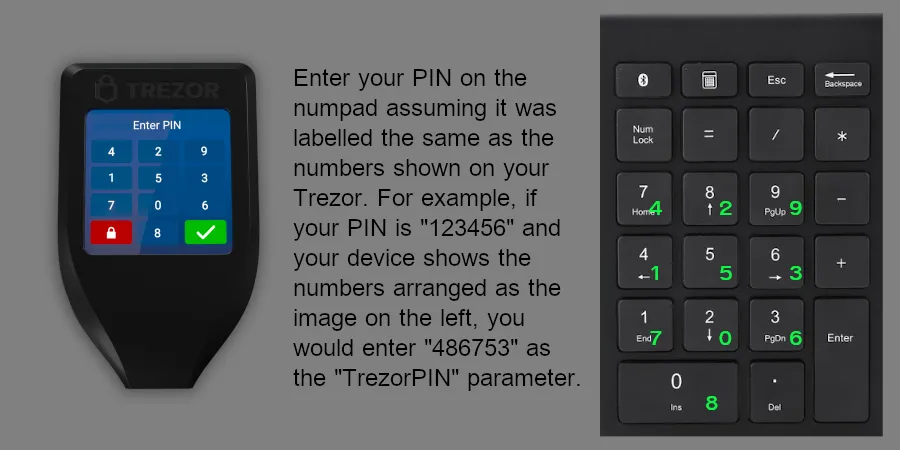
If the task::enable_qtum::status returns UserActionRequired, we need to use the task::enable_qtum::user_action method to enter our PIN
Arguments
| Parameter | Type | Required | Description |
|---|---|---|---|
| task_id | integer | ✓ | The identifying number returned when initiating the initialisation process. |
| user_action | object | ✓ | Object containing the params below |
| user_action.action_type | string | ✓ | Will be TrezorPin for this method |
| user_action.pin | string (number) | ✓ | When the Trezor device is displaying a grid of numbers for PIN entry, this param will contain your Trezor pin, as mapped through your keyboard numpad. See the image below for more information. |
Response
| Parameter | Type | Required | Description |
|---|---|---|---|
| result | string | ✓ | The outcome of the request. |
📌 Examples
Command
POST task::enable_qtum::user_action
{
  "userpass": "RPC_UserP@SSW0RD",
  "mmrpc": "2.0",
  "method": "task::enable_qtum::user_action",
  "params": {
    "task_id": 0,
    "user_action": {
      "action_type": "TrezorPin",
      "pin": "862743"
    }
  }
}curl --url "http://127.0.0.1:7783" --data '{
"userpass": "RPC_UserP@SSW0RD",
"mmrpc": "2.0",
"method": "task::enable_qtum::user_action",
"params": {
"task_id": 0,
"user_action": {
"action_type": "TrezorPin",
"pin": "862743"
}
}
}'import requests
import json
url = "http://127.0.0.1:7783"
payload = {
"userpass": "RPC_UserP@SSW0RD",
"mmrpc": "2.0",
"method": "task::enable_qtum::user_action",
"params": {
"task_id": 0,
"user_action": {
"action_type": "TrezorPin",
"pin": "862743"
}
}
}
response = requests.post(url, json=payload)
print(json.dumps(response.json(), indent=2))const payload = {
"userpass": "RPC_UserP@SSW0RD",
"mmrpc": "2.0",
"method": "task::enable_qtum::user_action",
"params": {
"task_id": 0,
"user_action": {
"action_type": "TrezorPin",
"pin": "862743"
}
}
};
const response = await fetch("http://127.0.0.1:7783", {
method: "POST",
body: JSON.stringify(payload),
});
console.log(await response.json());<?php
$payload = <<<'JSON'
{
"userpass": "RPC_UserP@SSW0RD",
"mmrpc": "2.0",
"method": "task::enable_qtum::user_action",
"params": {
"task_id": 0,
"user_action": {
"action_type": "TrezorPin",
"pin": "862743"
}
}
}
JSON;
$ch = curl_init("http://127.0.0.1:7783");
curl_setopt($ch, CURLOPT_POST, true);
curl_setopt($ch, CURLOPT_POSTFIELDS, $payload);
curl_setopt($ch, CURLOPT_RETURNTRANSFER, true);
curl_setopt($ch, CURLOPT_HTTPHEADER, ['Content-Type: application/json']);
$response = curl_exec($ch);
curl_close($ch);
echo $response;package main
import (
"bytes"
"fmt"
"io"
"net/http"
)
func main() {
payload := []byte(`{"userpass":"RPC_UserP@SSW0RD","mmrpc":"2.0","method":"task::enable_qtum::user_action","params":{"task_id":0,"user_action":{"action_type":"TrezorPin","pin":"862743"}}}`)
resp, err := http.Post("http://127.0.0.1:7783", "application/json", bytes.NewBuffer(payload))
if err != nil {
panic(err)
}
defer resp.Body.Close()
body, _ := io.ReadAll(resp.Body)
fmt.Println(string(body))
}require 'net/http'
require 'json'
require 'uri'
uri = URI("http://127.0.0.1:7783")
payload = {
"userpass": "RPC_UserP@SSW0RD",
"mmrpc": "2.0",
"method": "task::enable_qtum::user_action",
"params": {
"task_id": 0,
"user_action": {
"action_type": "TrezorPin",
"pin": "862743"
}
}
}
response = Net::HTTP.post(uri, payload.to_json, 'Content-Type' => 'application/json')
puts JSON.pretty_generate(JSON.parse(response.body))Show Response
Response (success)
{
  "mmrpc": "2.0",
  "result": "success",
  "id": null
}
Error Cases
CoinCreationError: Returned when a coin is not supported.
{
  "mmrpc": "2.0",
  "result": {
    "status": "Error",
    "details": {
      "error": "Error on platform coin QTUM creation: Coin doesn't support Trezor hardware wallet. Please consider adding the 'trezor_coin' field to the coins config",
      "error_path": "lib.init_qtum_activation.utxo_coin_builder",
      "error_trace": "lib:103] init_qtum_activation:71] utxo_coin_builder:234]",
      "error_type": "CoinCreationError",
      "error_data": {
        "ticker": "QTUM",
        "error": "Coin doesn't support Trezor hardware wallet. Please consider adding the 'trezor_coin' field to the coins config"
      }
    }
  },
  "id": null
}
task::enable_qtum::cancel
If you want to cancel the enabling process before it has completed, you can use this method.
Arguments
| Parameter | Type | Required | Description |
|---|---|---|---|
| task_id | integer | ✓ | The identifying number returned when initiating the enabling process. |
Response
| Parameter | Type | Required | Description |
|---|---|---|---|
| result | string | ✓ | Indicates task cancellation was succesful. |
| error | string | ✓ | An error message to explain what went wrong. |
| error_path | string | ✓ | An indicator of the class or function which reurned the error. |
| error_trace | string | ✓ | An indicator of where in the source code the error was thrown. |
| error_type | string | ✓ | An enumerated value for the returned error. |
| error_data | string | ✓ | The input task ID which resulted in the error. |
📌 Examples
Command
POST task::enable_qtum::cancel
{
  "userpass": "RPC_UserP@SSW0RD",
  "method": "task::enable_qtum::cancel",
  "mmrpc": "2.0",
  "params": {
    "task_id": 3
  }
}curl --url "http://127.0.0.1:7783" --data '{
"userpass": "RPC_UserP@SSW0RD",
"method": "task::enable_qtum::cancel",
"mmrpc": "2.0",
"params": {
"task_id": 3
}
}'import requests
import json
url = "http://127.0.0.1:7783"
payload = {
"userpass": "RPC_UserP@SSW0RD",
"method": "task::enable_qtum::cancel",
"mmrpc": "2.0",
"params": {
"task_id": 3
}
}
response = requests.post(url, json=payload)
print(json.dumps(response.json(), indent=2))const payload = {
"userpass": "RPC_UserP@SSW0RD",
"method": "task::enable_qtum::cancel",
"mmrpc": "2.0",
"params": {
"task_id": 3
}
};
const response = await fetch("http://127.0.0.1:7783", {
method: "POST",
body: JSON.stringify(payload),
});
console.log(await response.json());<?php
$payload = <<<'JSON'
{
"userpass": "RPC_UserP@SSW0RD",
"method": "task::enable_qtum::cancel",
"mmrpc": "2.0",
"params": {
"task_id": 3
}
}
JSON;
$ch = curl_init("http://127.0.0.1:7783");
curl_setopt($ch, CURLOPT_POST, true);
curl_setopt($ch, CURLOPT_POSTFIELDS, $payload);
curl_setopt($ch, CURLOPT_RETURNTRANSFER, true);
curl_setopt($ch, CURLOPT_HTTPHEADER, ['Content-Type: application/json']);
$response = curl_exec($ch);
curl_close($ch);
echo $response;package main
import (
"bytes"
"fmt"
"io"
"net/http"
)
func main() {
payload := []byte(`{"userpass":"RPC_UserP@SSW0RD","method":"task::enable_qtum::cancel","mmrpc":"2.0","params":{"task_id":3}}`)
resp, err := http.Post("http://127.0.0.1:7783", "application/json", bytes.NewBuffer(payload))
if err != nil {
panic(err)
}
defer resp.Body.Close()
body, _ := io.ReadAll(resp.Body)
fmt.Println(string(body))
}require 'net/http'
require 'json'
require 'uri'
uri = URI("http://127.0.0.1:7783")
payload = {
"userpass": "RPC_UserP@SSW0RD",
"method": "task::enable_qtum::cancel",
"mmrpc": "2.0",
"params": {
"task_id": 3
}
}
response = Net::HTTP.post(uri, payload.to_json, 'Content-Type' => 'application/json')
puts JSON.pretty_generate(JSON.parse(response.body))Show Response
Response (success)
{
  "mmrpc": "2.0",
  "result": "success",
  "id": null
}