
Installing the Komodo DeFi Framework API
Minimum Requirements for Installation
-
MacOS, Windows (see note below), and Linux (see note below)
-
64-bit (see note below for 32-bit)
-
Minimum 2GB of free RAM
-
Normal user account with admin/root privileges
Note about Linux
For Linux users, much of the following documentation assumes that you are building and running the Komodo DeFi Framework API on a Debian 9/10 or Ubuntu 18.04 host. If you have questions about other releases or distributions, please reach out to us on the #dev-marketmaker channel on Discord.
Note about Installing on Windows
Developing software on Windows typically requires an installation of Git Bash.
Git Bash is a terminal shell based on Unix. It is similar to the Windows Shell or Windows Command Prompt, but uses Unix-based syntax.
All instructions in the Komodo DeFi Framework documentation are given with Unix-based syntax, and therefore we recommend installing Git Bash before proceeding.
You may download and install Git Bash for Windows here:
The download should begin automatically.
Double-click the downloaded .exe file and follow the Installation Wizard.
Once Git Bash is open and running on your machine, you may continue.
Note About 32-bit Operating Systems
We are currently testing 32-bit operating system functionality. As 32-bit machines can often be comparatively older hardware, we cannot guarantee that Komodo DeFi Framework API will run successfully by default.
We invite users of 32-bit operating systems to test the software and report any errors to our team on the #dev-marketmaker channel on Discord.
Installing Dependencies
Rust
Install Rust:
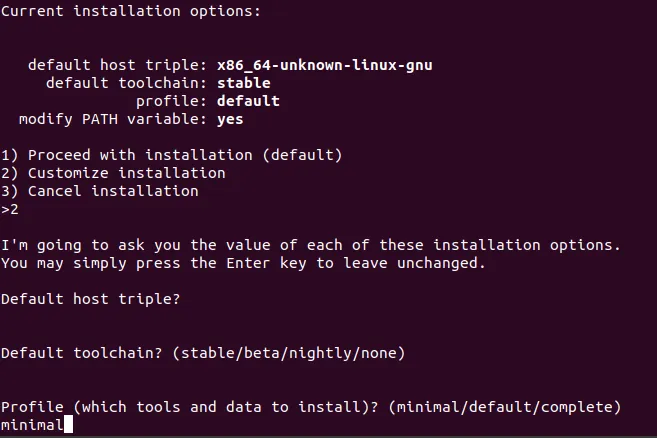
Choose 2) to customize the installation, select default host triple and default toolchain, and choose the minimal profile.
cmake Version 3.12 or Higher
Download the cmake software here: download link
Unpack and follow the instructions here: instructions link
Build Tools for Your OS
Linux:
sudo apt-get install build-essentialWindows:
Follow these instructions for MSVC
MacOS:
Install XCode via the App Store
Install Additional Dependencies
Install the following additional dependencies using the terminal.
sudo apt-get install -y git llvm-3.9-dev libclang-3.9-dev clang-3.9 libssl-dev pkg-configIf you are using Ubuntu-20.04, run:
sudo apt-get install -y git llvm-dev libclang-dev clang libssl-dev pkg-configInstall Additional Rust Components
Install additional Rust components:
rustup install nightly-2022-02-01rustup default nightly-2022-02-01(Optional) Skip this step if it fails.
rustup component add rustfmt-previewInstall jq
jq is an optional, but useful addition to our needed software. jq can provide a more readable format of JSON output in the terminal, which helps us more quickly digest the data response output by the Komodo DeFi Framework API.
Linux:
sudo apt-get install jqMacOS:
Download the appropriate file from this link.
In your terminal, make the file executable by changing into the directory where the file downloaded and executing:
chmod +x jqExecute the file.
Windows:
Download and execute the appropriate file from this link.
Build Komodo DeFi Framework
Clone the Komodo DeFi Framework repository:
cd ~
git clone https://github.com/KomodoPlatform/komodo-defi-framework --branch main --single-branch && cd komodo-defi-frameworkCompile the source code:
cargo build --features native -vvMacOS
If the above command results in an error, use the following command instead.
LIBRARY_PATH=/usr/local/opt/openssl/lib cargo build --features native -vvAlternatively, create a permanent link called libcrypto to /usr/local/lib.
ln -s /usr/local/opt/openssl/lib/libcrypto.a /usr/local/libIf everything installed successfully, a response that is similar to the following should appear.
“Finished dev [optimized + debuginfo] target(s) in 3m 33s”The Komodo DeFi Framework API executable is now built and available here: ~/komodo-defi-framework/target/debug/kdf